
Earnings & getting paid
Track what you’ve earned, when each sale becomes available, and when it reaches your bank.
Check your Earnings
In the sidebar under Finance, open “Earnings”. Four cards show Total earned, Available (ready for payout), Pending (in the 7-day hold) and Paid out. Below, “Recent sales” lists every sale with your share after fees.

Understand each sale’s status
Held means the sale is in the 7-day hold. The “Available on” column shows the date it frees up. Available means it goes out in the next payout. In transit means it’s on the way to your bank. Paid out means it’s done.

Add your payout account
Open “Payout account” under Finance and fill in your business details, PAN, contact and bank account, then click “Submit for verification”. Once it’s verified the status turns Active and payouts start automatically.

Track your payouts
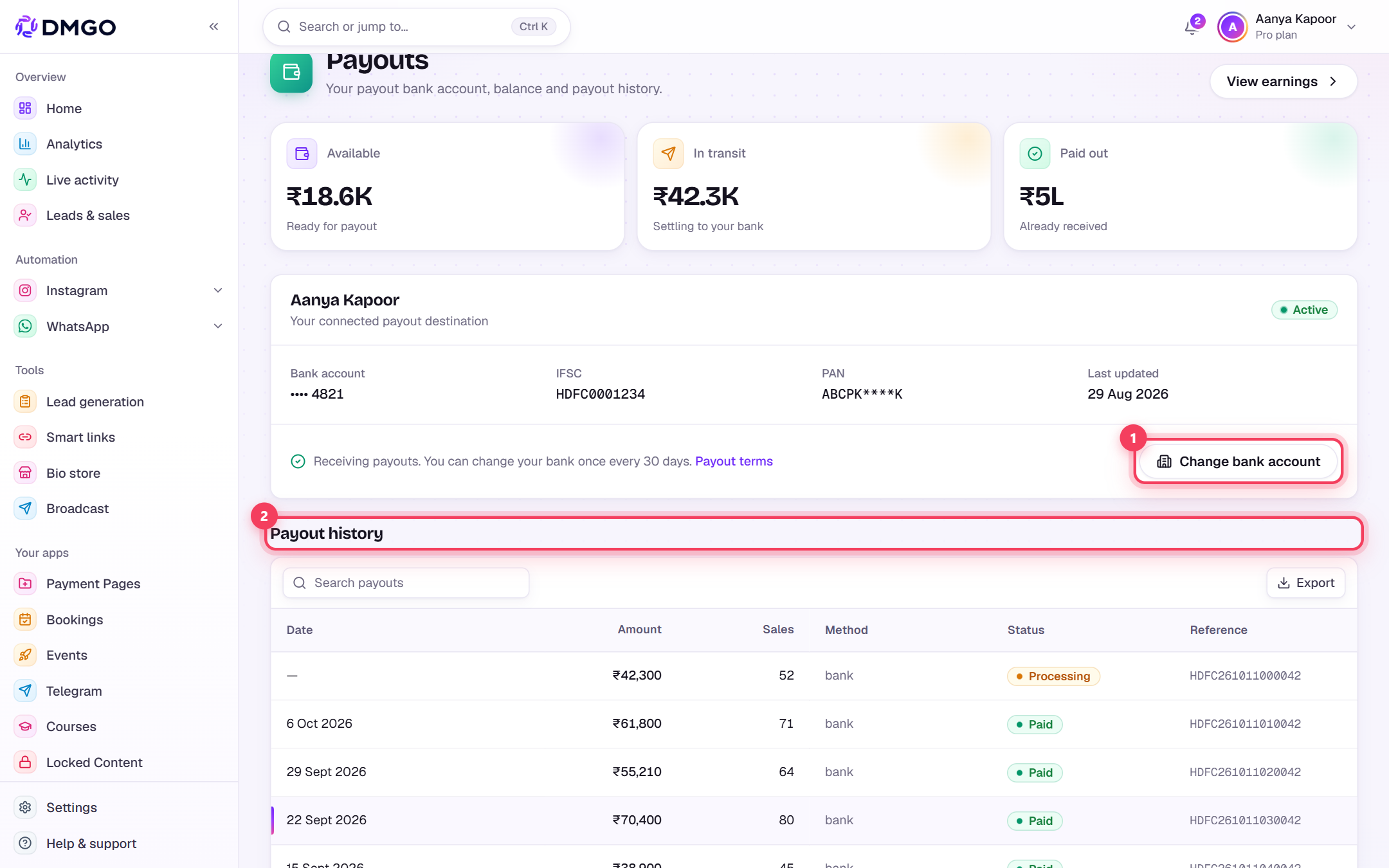
The Payout account page shows your Available, In transit and Paid out balance, and “Payout history” lists every payout with its bank reference (UTR). Need a different bank? Use “Change bank account” (allowed once every 30 days).
Error messages you might see
The exact text DMGO shows, what it means and how to fix it.
Razorpay needs more details. Payouts are paused until it's resolved.What it means: Razorpay’s KYC review asked for more information. The notice shows what was “Requested”, if Razorpay said. Nothing is paid out until it’s cleared.
Fix: Click “Resolve on Razorpay” and submit what’s asked, or reply to Razorpay’s email. Payouts resume automatically once Razorpay clears it. No need to re-submit in DMGO.
Razorpay could not verify this account.What it means: Your payout KYC was rejected, so payouts can’t start. The notice adds “Contact support to re-submit your KYC.”
Fix: Raise a ticket. Keep your PAN and bank details ready, with the account holder name exactly as on your PAN.
This payout account is suspended.What it means: Payouts to this account have been stopped. The notice adds “Contact support to restore payouts.”
Fix: Raise a ticket so the team can review and restore payouts.
Invalid PAN formatWhat it means: The PAN you entered isn’t in the standard 10-character format (5 letters, 4 digits, 1 letter).
Fix: Re-type the PAN exactly as printed on the card, with no spaces.
Account holder name does not match your KYC name. Enter the bank account exactly as per your KYC/PAN.What it means: For a bank change, the new account holder name must match the name you verified in KYC.
Fix: Use a bank account in your own (KYC) name and type the name as it appears on your PAN.
Razorpay could not verify this bank account. Check the account number and holder name, then try again.What it means: Razorpay’s bank check failed for the new account in your bank-change request.
Fix: Double-check the account number, IFSC and holder name against your passbook or bank app, then submit again.
You can change your payout bank only once every 30 days. Next available <date>.What it means: You changed your payout bank recently. For safety, bank changes are limited to once every 30 days.
Fix: Wait until the date shown. Payouts keep going to your current bank meanwhile.
Was this guide helpful?
Did this not solve it?
Raise a ticket — no account needed. Continue securely from your ticket link.