
Connect your Instagram account
Link your Professional Instagram account so automations and your Bio Store can work.
Before you start
- Your Instagram must be a Professional account (Business or Creator). A personal account will be rejected.
- Open DMGO in a normal browser (Chrome/Safari), not inside another app’s in-app browser.
Open Instagram accounts
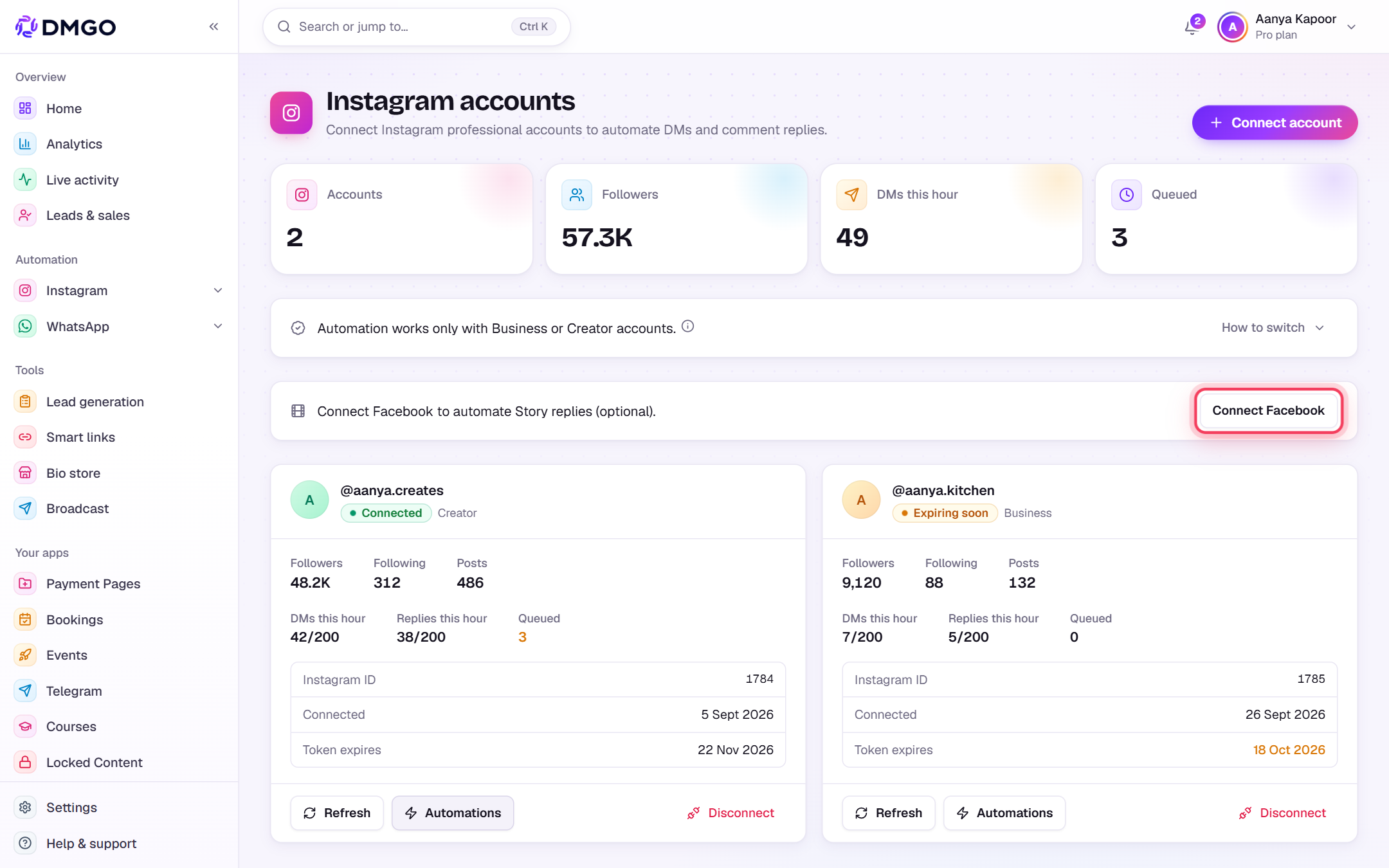
In the sidebar under Account, click “Instagram accounts”. Then press “Connect account” at the top-right.

Not a Professional account yet?
Open “How to switch” on the same page for the steps. In the Instagram app: Settings → Account type and tools → Switch to professional account. It’s free and takes a minute.

Approve on Instagram
Instagram opens. Log in to the account you want to connect and tap Allow. Approve every permission asked: DMGO only asks for what it needs to read comments and send replies. We never see your password.
You’re connected
Back in DMGO your account shows as a card with a green “Connected” badge, your followers, and how many DMs and replies went out this hour. Use Refresh to update the numbers, Automations to see its automations, or Disconnect to remove it.

A yellow “Expiring soon” badge means Instagram’s access is about to end. Click Connect account again with the same Instagram to renew it. Your automations stay as they are.
(Optional) Connect Facebook for Story replies
Want to auto-reply when people reply to your Stories? Click “Connect Facebook” on the same page and pick the Facebook Page linked to your Instagram.
Error messages you might see
The exact text DMGO shows, what it means and how to fix it.
@<username> is a personal Instagram account. Switch it to a Professional account (Business or Creator), then reconnect.What it means: Instagram only lets Business and Creator accounts use automated comments and DMs, so DMGO rejects personal accounts.
Fix: In the Instagram app: Settings → Account type and tools → Switch to professional account. Then click “Connect account” again.
Please open DMGO in Safari or Chrome to connect Instagram. Tap the ⋯ menu and choose "Open in browser".What it means: You opened DMGO inside another app’s built-in browser (Instagram, Facebook and others), where Instagram login fails.
Fix: Do what it says: ⋯ menu → “Open in browser”, then connect from Safari or Chrome.
Your <plan> plan allows <number> Instagram account(s). Upgrade to connect more.What it means: You’ve already connected as many Instagram accounts as your plan includes. Reconnecting an account you already have still works.
Fix: Tap Upgrade for more accounts, or disconnect an account you no longer use.
This Instagram account is already connected to another DMGO user.What it means: The same Instagram is linked to a different DMGO login. DMGO never moves an account between users on its own.
Fix: Sign in to the other DMGO account and disconnect it there first, or raise a ticket if you don’t have access to it.
No authorization code received from Instagram.What it means: Instagram sent you back to DMGO without completing the approval, for example after a reload or an old, half-finished login page.
Fix: Click “Connect account” again and finish on Instagram by tapping Allow.
Could not connect Instagram account.What it means: A general connect failure with no specific reason from Instagram.
Fix: Try again from Chrome or Safari and approve every permission. If it keeps failing, raise a ticket with the time you tried.
Was this guide helpful?
Did this not solve it?
Raise a ticket — no account needed. Continue securely from your ticket link.